Skip to content
Truman State University
  • Admission
  • Academics
  • Alumni
  • About
  • Student Life
  • News & Events
  • Truview Login
  • Athletics
  • Directory
  • ITS Home
  • Get Help
    • Get Help
    • Technical Phone Support
    • Student Computing (How To)
    • How do I?
    • IT Service Center Laptop Checkout
    • Documentation
    • Training & Tutorial
    • Security Awareness
    • Phone Services
  • Forms
  • Purchasing Technology
  • Software & Labs
    • Software and Labs
    • Computer Lab Map
  • Learning Technologies
  • Policies & Procedures
  • Enterprise Systems
    • Enterprise Systems
    • Student Directory Data Request
  • About ITS
    • About ITS
    • IT Governance
    • ITS Annual Reports
    • Planning
  • Home
  • Windows 11: Connecting Wirelessly to the Truman Network

Windows 11: Connecting Wirelessly to the Truman Network

Windows 11: Connecting Wirelessly to the Truman Network

First, locate your Wireless icon. It should be near the date and time on your Taskbar, in the bottom right-hand corner. Click on it, and a menu that looks similar to the following screen should appear:

Quick Panel Menu
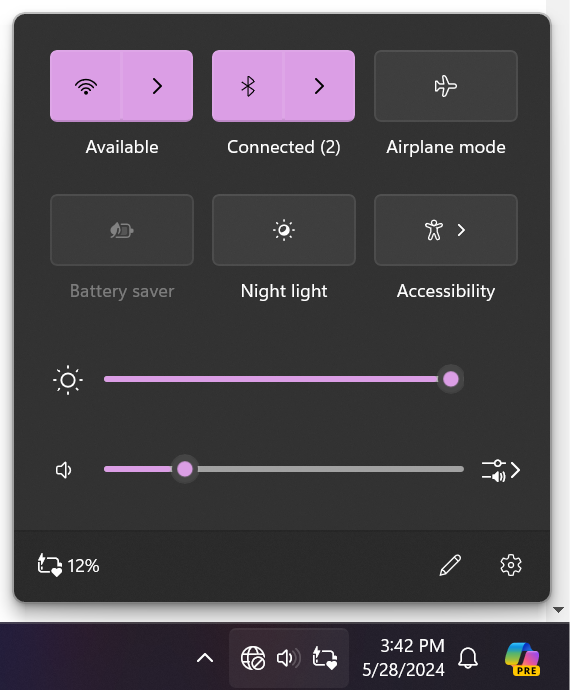
Quick Panel Menu
Quick Panel Menu

Then Click on the Wi-Fi Icon. This will open up the Wi-Fi Menu. Select Truman Secure Wireless from the menu. Be sure to click “Connect automatically”, then click “Connect”.
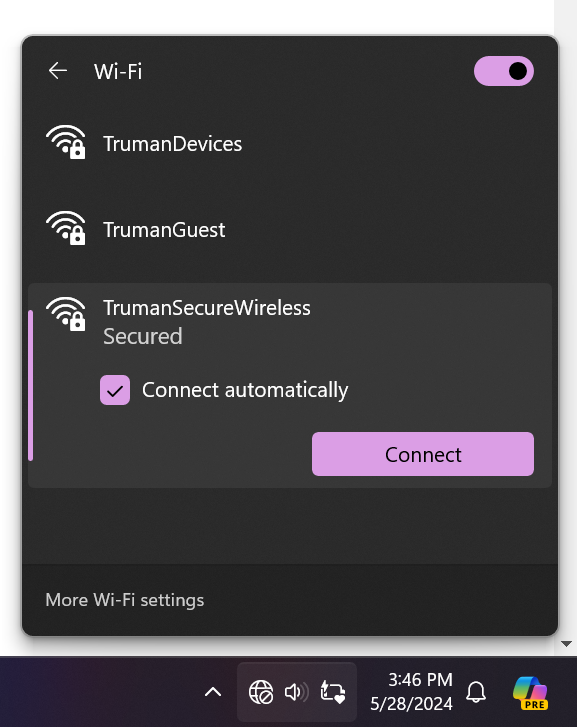
Wi-Fi Menu
Screenshot of Wi-Fi Menu

It will then prompt you to enter your Truman credentials. After entering the correct credentials, press Ok.
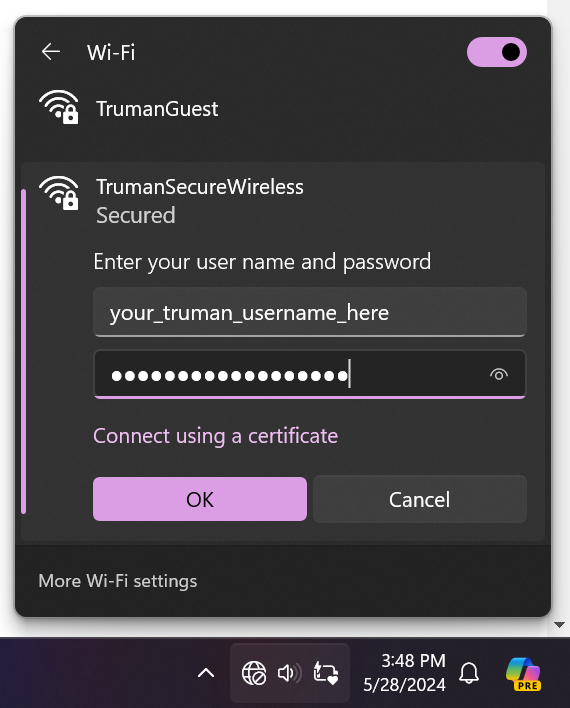
Wi-Fi Credentials
Screenshot asking for Wi-Fi credentials

Once you press connect, it’ll ask you to confirm the connection.
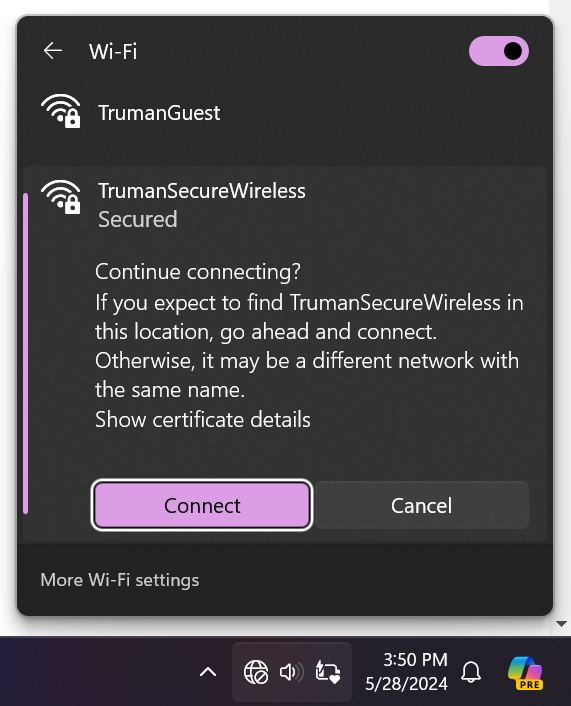
Confirm Connection
Confirm Connection

Once done, you will be connected to the TrumanSecureWireless.

Truman Logo
Truman State University
100 E. Normal Avenue
Kirksville, MO 63501 USA
(660) 785-4000
©2026 Truman State University
   Contact Us
Give To Truman
  • Get to Know Truman
    • Admission
    • Academics
    • Alumni
    • Student Life
    • About Truman
  • Explore
    • News & Events
    • Athletics
    • Directory
    • Parents & Families
    • Employment
    • TruView
    • Maps & Directions
  • Policy and Safety
    • Policies
    • Title IX/Statement on Non-Discrimination
    • Disclosures
    • Privacy Policy
    • Accessibility
    • Emergency Information

Truman State University is an equal opportunity and affirmative action employer.

Back to Top